
Uptime, TLS and performance monitoring

Know your websites are up, secure and fast, before your customers notice.

APEX Pingmora watches your websites and web applications from the outside. It checks availability over HTTP and HTTPS, reads every TLS certificate in detail, measures where page-load time goes and identifies the technology behind each site, with charts and reports anyone can read.

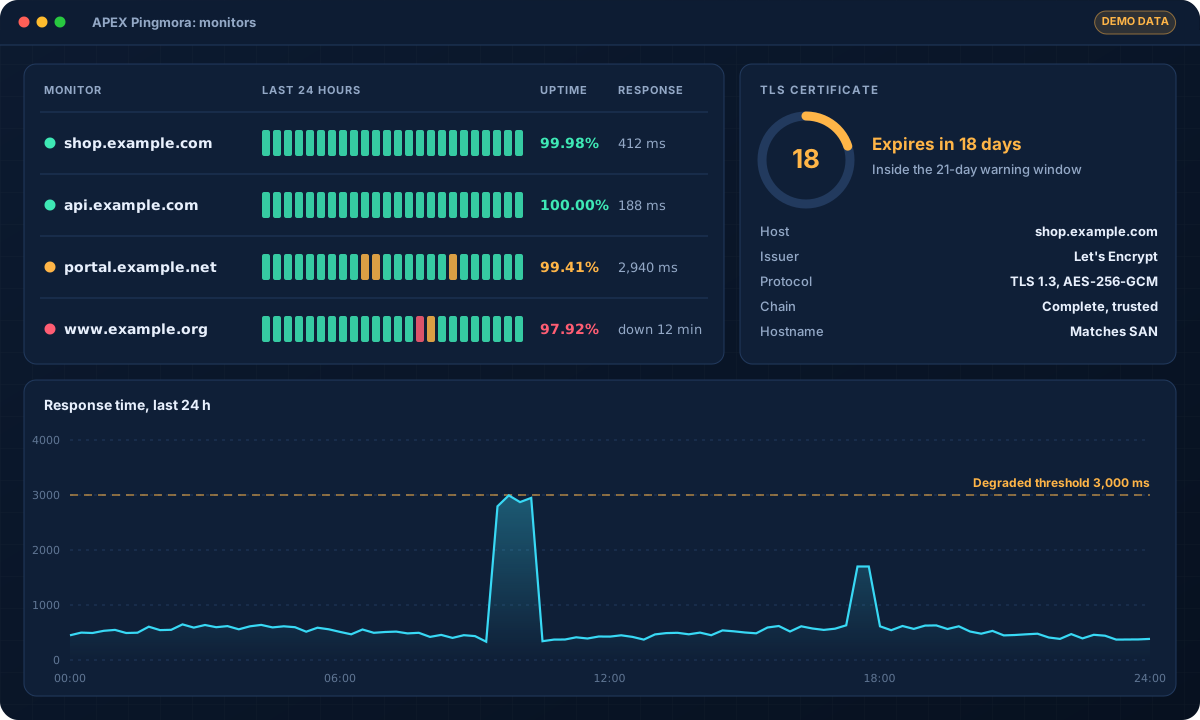
Illustration of the APEX Pingmora dashboard with demo data: monitors with 24-hour availability strips, uptime and response times, a TLS certificate expiring in 18 days and a 24-hour response-time chart
Illustration with demo data. Monitors, certificate status and response time.
5timing phases per check
102technology signatures
21days default certificate warning window
1 minshortest check interval in the interface

Overview

Outside-in visibility of your web presence

A website can be down, slow or one day away from an expired certificate while every internal system looks fine. Customers notice first, and trust suffers.

Pingmora checks each site on its own schedule, from every minute to once a day. It verifies the answer, reads the TLS certificate even when it is invalid, breaks the response time into its phases and records which technologies the site exposes.

Cybercontrol uses Pingmora to deliver website and certificate monitoring, and to watch the public face of every customer's attack surface.

Capabilities

Everything you need to know about a website's health

Every capability below exists in the current version of the product.

01

Uptime monitoring

Flexible HTTP checks for websites, APIs and endpoints, with an exact definition of what "up" means.

  • Methods GET, HEAD, POST, PUT and OPTIONS, custom headers and body
  • Expected status codes and a keyword that must, or must not, appear
  • Intervals from 1 minute to 1 day, 15-second default timeout
  • A degraded state when responses exceed a threshold (3,000 ms by default)
02

HTTP and HTTPS monitoring

HTTP and HTTPS are checked separately, so a broken redirect or a missing security header does not hide behind a working page.

  • HTTP-to-HTTPS redirect
  • HSTS and HTTP/2 support
  • Follow-redirect and TLS-verification options
  • Health checks for APEX and ARES applications, with the failing components
03

TLS certificate monitoring

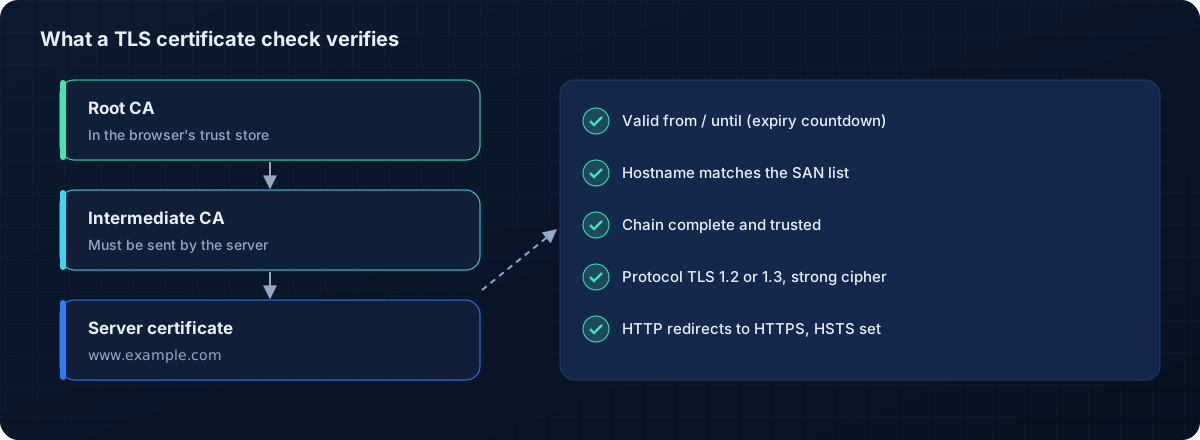
The full certificate is read, even when it is invalid or already expired, so you see exactly what is wrong.

  • Days to expiry, issuer, key, protocol version and cipher
  • Chain and hostname validation, subject alternative names
  • Configurable warning window, 21 days by default (1 to 365)
  • A dashboard list of certificates that need attention
04

Performance analysis

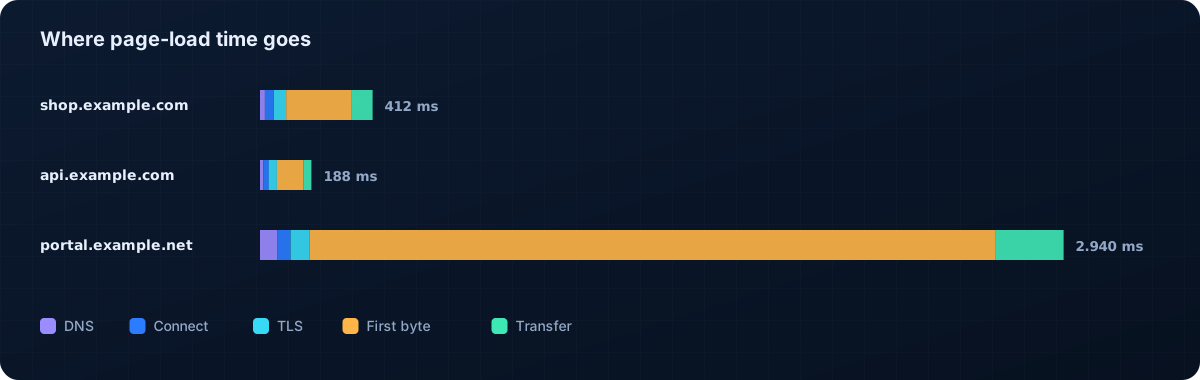
Every check splits the response time into five phases, so you know whether a slow site is a DNS, network, TLS or application problem.

  • DNS, connect, TLS, first byte and transfer
  • ICMP ping, or TCP handshake time where ICMP is blocked
  • "Why degraded?" explains the cause of a slow result
  • "Check now" runs a test with a step-by-step trace
05

Technology fingerprinting

102 signatures identify web servers, CDNs, frameworks, content-management systems and JavaScript libraries, with the evidence for each match.

  • Evidence shown for every detected technology
  • Changes in the technology stack are logged
  • Useful input for vulnerability management and attack-surface reviews
06

Historical reports

Availability and performance history, ready for management and for service reviews.

  • Availability strips for 24 hours, 7 days and 30 days
  • Detail views from 1 hour to 1 year
  • PDF, CSV or HTML reports for the previous day, week, month or year
  • Reports downloaded or emailed on a schedule
07

Secure by design

A multi-user application where each user sees only their own monitors.

  • Two-factor authentication (TOTP) required by default, recovery codes
  • Account lockout after repeated failed sign-ins
  • API tokens with read, write and admin scopes and expiry dates
  • Encrypted backups (AES-256-GCM) to local disk, SFTP or S3

Inside the product

Inside a check

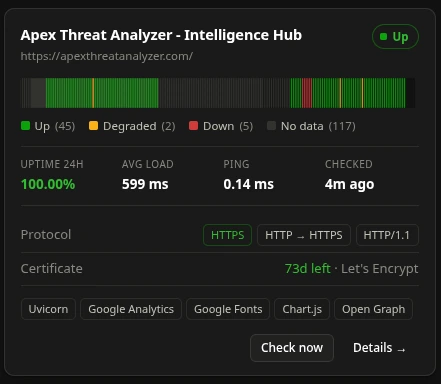
Each check records what happened at every step, from the DNS lookup to the last byte, and what the TLS certificate says.

Use cases

Who uses it, and for what

E-commerce and online services

Make sure shops, booking systems and customer portals are reachable and fast.

Certificate management

See every certificate that is about to expire, misconfigured or served with an incomplete chain.

IT service providers

Show customers availability reports for the sites and applications you run for them.

Attack-surface reviews

Track which technologies and versions your public sites expose, and when they change.

Specifications

Technical specifications

Deployment and integration details of the current version (1.3).

Cybercontrol cloud

Monitoring as a managed service: we configure the checks, review the results and follow up with you.

Your infrastructure

Run Pingmora on Kubernetes, with Docker Compose or as a native Linux package on your own servers.

Check typesHTTP(S) checks; health checks of APEX and ARES applications
Intervals1 minute to 1 day in the interface; down to 30 seconds through the API
TimingDNS, connect, TLS, first byte, transfer; ICMP or TCP ping
TLS detailsExpiry, issuer, key, protocol, cipher, chain, hostname, SANs, protocol support
Technology detection102 signatures with evidence
ReportsPDF, CSV, HTML; day, week, month, year; download or scheduled email
APIREST API under /api/v1 with OpenAPI description and scoped, expiring tokens
SecurityTOTP 2FA, account lockout, per-user monitors, encrypted backups
DeploymentKubernetes, Docker Compose (PostgreSQL or SQLite), native Linux packages (.deb, .rpm, .pkg.tar.zst)
Not includedInstant push notifications, multiple checking locations, public status pages and single sign-on are not part of the current version

APEX Pingmora

Technical questions

Does Pingmora send instant down alerts?

The current version shows problems on the dashboard and in scheduled email reports; it does not send instant notifications. In Cybercontrol's managed service our team follows up on outages and expiring certificates.

Can it monitor internal applications?

Yes, when Pingmora runs inside your network it can check internal sites and APIs as well as public ones.

Does it work with certificates from any authority?

Yes. Pingmora reads any certificate the server presents, from public or private authorities, and reports what is wrong even when the certificate is invalid.

Who can see our monitors?

Each user sees only their own monitors. Administrators manage users, and access requires two-factor authentication by default.

See your own websites in APEX Pingmora

Book a demo and we will check a few of your sites live: availability, certificates, timing and technology.

Contact

Let's talk about your security

Tell us about your company and what worries you. A specialist will reply with next steps and, if you want, schedule a free initial assessment or a product demo.

What happens next

  • A specialist reads your message and replies
  • A short call to understand your needs
  • A free assessment or a tailored demo

Sending opens your email app with the message ready. Nothing is stored on this website.